Your sample rate, watched.
A menu bar app for macOS that watches your audio interfaces and keeps the sample rate you chose. When another app rewrites it, ClockGuard detects the change and restores your rate in milliseconds.
● macOS 14.2+ · sandboxed · no audio access, ever
On macOS, any app can set a new sample rate on a shared audio device — and plenty of them do, without asking. One silent write and your session clock is broken.
The aftermath is familiar: mismatched clocks, resampling where you wanted none, plugins misbehaving, and that one take that sounds subtly wrong — and you only find out later.

ClockGuard doesn’t pretend to lock your device — macOS has no such thing for shared devices. It does something better: it watches, names the likely culprit, and puts your rate back before you’d ever notice.
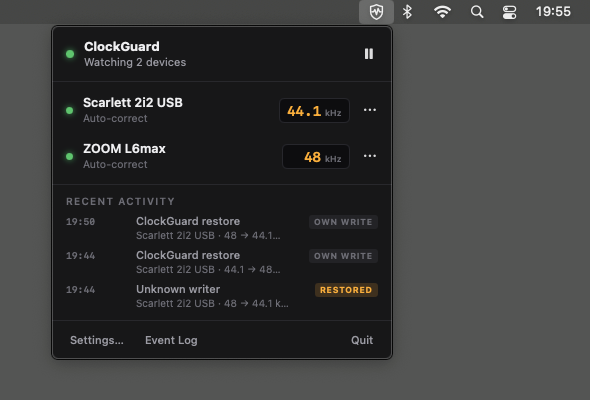
ClockGuard watches every audio interface through CoreAudio device properties. The instant any app writes a new sample rate, it knows.
96.0 → 48.0 kHzIt points to the likely culprit with a confidence level — high, medium or low. Attribution on macOS is heuristic, so ClockGuard says “likely”, never “guilty”.
likely: Zoom · highDepending on the device’s mode, ClockGuard notifies you and/or writes your chosen rate back — typically within milliseconds of the change.
● restored in 40 msWhile a device is actively recording or playing, ClockGuard never auto-corrects — it only warns. Changing the rate mid-take is exactly the kind of dropout it exists to spare you from. That’s a feature, not a limitation.
Each interface gets its own target rate and mode: Auto-correct or Notify only. Your Scarlett at 96 kHz, your Bluetooth headset left alone.
The icon tells the story at a glance: watching, a recent event that gently decays, or paused. No dock icon, no clutter.
A hardware-style panel per device — LEDs and rate displays — right from the menu bar.
Authorize apps you trust. When your DAW opens a project at another rate, that’s intentional — no correction, no fight.
An insistent app — say, a Zoom call that keeps writing 48 kHz — gets a truce and one grouped notice. No re-lock war on your device.
Global or per device: 30 minutes, 1 hour, or until you switch it back on. For when you want the call to just work.
Every event: what changed, the likely writer with confidence, rate before/after, and the action taken. Receipts, not vibes.
Set it once and forget it exists — until the day it saves your session.
| ● Rate changed 96 → 48 kHz on Scarlett 2i2 | likely: Zoom · high | restored in 40 ms | |
| ● Logic Pro opened a 44.1 kHz project | allowlisted | no action | |
| ● Rate changed 96 → 44.1 kHz on Apollo Twin | likely: DaVinci · med | notified (device in use) |
ClockGuard watches device settings — not sound. It has no way to hear you, and it never will.
ClockGuard never records, monitors or touches your audio signal. There is no audio path in the app at all.
It never asks for mic access — because it doesn’t need it. If a “ClockGuard wants to use the microphone” dialog ever appeared, that would be a bug.
It observes and writes exactly one kind of thing: audio device properties — your sample rate — via CoreAudio.
Distributed on the Mac App Store, inside the macOS sandbox, playing by Apple’s rules.
No in-app purchases, no trial that expires, no account, no catch. ClockGuard is a gift to people who care about their clock — from someone who does too.
📼 By the maker ofOctoTrack Studioan honest 8-track tape machine for macOSBecause macOS doesn’t allow it — and any tool that promises otherwise is overselling. CoreAudio has no API to lock the rate of a shared device: as long as apps share your interface, any of them can write a new rate at any time. The only true “lock” is taking the device in exclusive hog mode, which would break every other app using it.
So ClockGuard does the honest version: it detects the change and restores your rate in milliseconds. In practice, you get the result you wanted — your session stays at your rate — without lying about how the platform works.
Never. While a device is actively recording or playing, ClockGuard only warns — auto-correction waits until the device is idle. Changing the clock mid-take causes exactly the dropout you’re trying to avoid, so a take is never ruined by ClockGuard itself.
It can’t know for certain — macOS doesn’t report who wrote a device property. ClockGuard uses heuristics (what’s running, what just started, who owns audio pipes) and tells you the likely culprit with a confidence level: high, medium or low. It names, it doesn’t accuse.
No. ClockGuard has no audio path: it never captures sound and never asks for microphone permission. It only observes and writes device properties — the sample rate — via CoreAudio.
ClockGuard detects the pattern and declares a truce instead of starting a re-lock war: you get one grouped notice, and your rate is restored once the insistent app lets go (or you can snooze the device until the call is over). You can also allowlist apps whose rate changes are always intentional, like your DAW.
Because it should exist, and because it’s a good way to meet you. ClockGuard is by the maker of OctoTrack Studio, WPTRAT’s 8-track tape machine for macOS. No purchases, no upsells inside ClockGuard — ever.
macOS 14.2 or later. ClockGuard is sandboxed and distributed through the Mac App Store.
● free · macOS 14.2+ · no audio access, ever