Plug in and play.
A standalone player for macOS that runs your NAM captures — A2 and A1, an amp, a pedal or a whole rig, with or without a cab. No project to open, no plugin to insert, no DAW to boot: one window, one knob to set, and it’s already making noise.

● macOS 14+ · sandboxed · no data collected, ever
Captures sound extraordinary. Getting to them doesn’t: launch the DAW, wait for the plugins to scan, open a template, arm a track, find the amp plugin, load the capture, remember the buffer size. By the time there’s sound, the idea is gone.
So the guitar stays on the wall. The best rig is the one that’s already on.
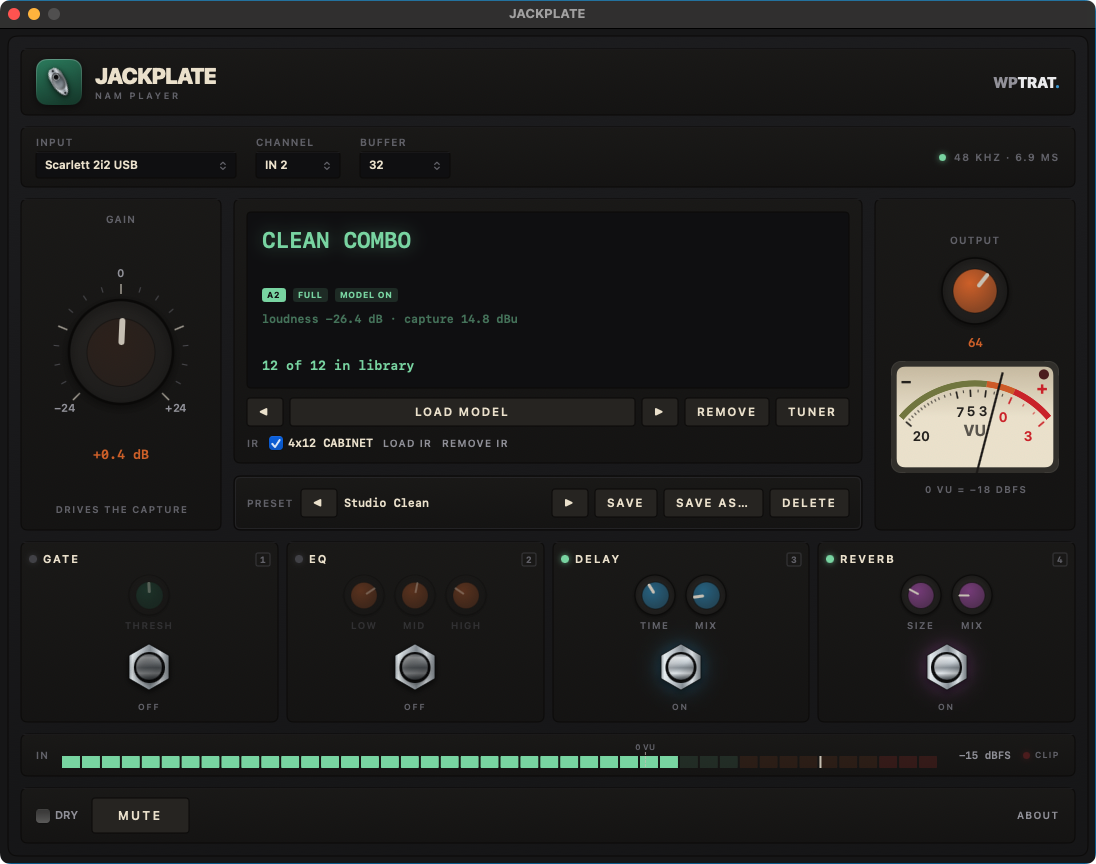
Jackplate is a player, not a workstation. It opens as one fixed window — no project, no timeline, no save prompt — talking straight to your interface.
Drop in the .nam files you already own — one at a time or a whole tone pack .zip. They go into your library and the arrow keys walk through them while you play.
◀ DRRI New 57+121 ▶One GAIN knob and an honest input meter: RMS bar, peak cursor, clip lamp. Green most of the time is the whole trick — the amp reacts to level exactly like the real one did.
IN ▮▮▮▮▮▮▯▯ −12 dBThat’s it. Your capture already has a cab? Leave the IR off. Doesn’t? Load one. Then kick in the gate, the EQ, the delay or the reverb — four footswitches, four number keys.
1 GATE · 2 EQ · 3 DLY · 4 RVBJackplate comes with no captures and no IRs — the ones worth playing belong to the people who made them, and redistributing someone’s capture isn’t ours to do. You bring your own files, from wherever you got them, and the app plays them. An honest player, not a locked store.
A2 arrived in 2026 and reset the bar for what a capture can sound like: same open .nam format, a new architecture, and libraries retrained wholesale so the tones you already know came back better. Jackplate plays them natively — and plays your older A1 files exactly the same way.
A2 models are slimmable: the same file holds a full-size network and a lighter one. Jackplate picks the right size for your Mac and lets you switch live, mid-chord, when you’d rather have the CPU back.
FULL ⇄ LITEEvery A1 capture on your drive still loads and still plays. No conversion, no re-download, no “legacy” folder. The library you built is the library you keep.
A1 · A2 · one libraryA capture isn’t only an amp head. It might be a fuzz box, a preamp, a piece of outboard, or an entire signal chain with the cab already in it — Jackplate plays whatever was captured.
amp · pedal · rigA signal chain, four effects, a tuner and presets — the amount of gear you can actually operate with a guitar hanging off your shoulder.
Import .nam files or a whole tone pack .zip at once — A2 and A1 side by side. Step through them with ← and → without stopping the sound.
Load your own impulse response .wav when the capture is an amp head or a pedal — and leave it off when the capture already came with the cab.
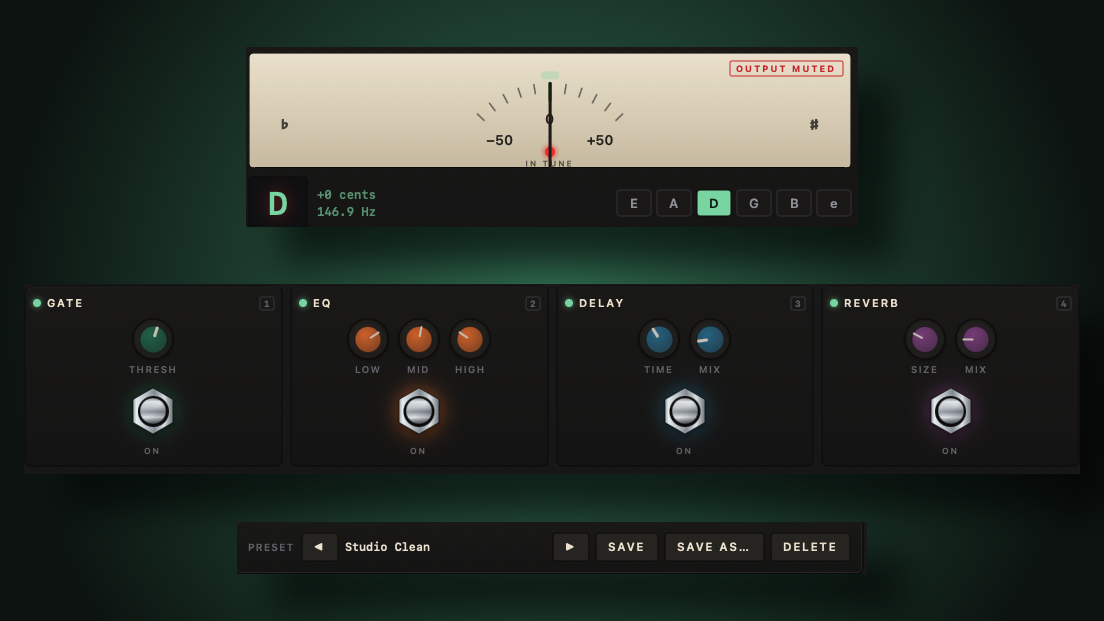
Noise gate, 3-band EQ, delay and reverb — in that order, the order that works. Keys 1 to 4, footswitches on screen.
Press T and the output mutes while a fluid needle finds the note. Silent tuning, like a proper pedal.
A preset is the whole sound: capture, cab, all four effects and both gains. Save it with ⌘S and step through your presets from the keyboard.
An input strip with RMS, peak and clip, and an analogue-ballistics VU on the output. Set your level by eye, the way you always did.
A2 captures carry two model sizes in one file. Jackplate picks the right one for your Mac and switches live, mid-chord, when you want the CPU back.
Captures made at 44.1 or 96 kHz play at your 48 kHz session rate through a built-in resampler — about 0.3 ms, and the display tells you when it’s on.
M mutes, D goes dry, ⌘/ lists every shortcut. An optional menu bar icon mutes it with the window closed.
Jackplate talks to your interface directly, with no audio graph in the critical path — the capture runs on the audio thread and nowhere else. The buffer size you pick is most of what you feel:
| Buffer | Buffer alone |
|---|---|
| 32 | 0.67 ms |
| 64 | 1.33 ms |
| 128 | 2.67 ms |
| 256 | 5.33 ms |
Jackplate needs to hear your guitar — that’s the entire job. What it does with that sound is turn it into an amp and send it to your speakers. Nothing else, nowhere else.
Audio goes in, through the amp, and out. It is never written to disk, never buffered for later, never uploaded.
No accounts, no telemetry, no analytics, no update pings. The app has no reason to reach the internet and doesn’t.
Captures and IRs you import are copied into the app’s own folder on your Mac. Nothing is shared or phoned home.
Distributed through the Mac App Store, inside the macOS sandbox, with three permissions and not one more.
macOS will ask for microphone permission on first launch — that is how any app receives audio input, including your guitar coming through your interface.
No in-app purchases, no trial that expires, no account, no catch. Jackplate is what a capture player should have been: you already paid for the captures.
🛡️ By the maker ofClockGuardthe free sample rate watcher for macOSA .nam file is captured gear: someone ran a test signal through the real thing, recorded what came out, and trained a model to reproduce it. It doesn’t have to be an amp — people capture pedals, preamps, outboard and entire signal chains with the cab already in them.
The format is open and there are hundreds of thousands of captures out there, free and paid. Jackplate plays the ones you have.
Yes — natively, and that was the point. Architecture 2 landed in 2026 as the new generation of the same open format, and the big libraries were retrained for it, so the captures you already knew came back sounding better.
It also uses what A2 calls slimmable models: an A2 file carries more than one model size, so Jackplate can run it full or slim and let you swap between them while you play. Your A1 files keep working exactly as before, in the same library.
No — and that’s deliberate. Captures belong to the people who made them, and shipping someone else’s work inside a store app isn’t something we’re willing to do. You bring your own .nam files and IRs; the app is the player.
macOS 14 or later, and an audio interface with your guitar plugged into it — the same box you’d use to record. Jackplate uses one device for input and output; if you want to mix two, make an aggregate device in Audio MIDI Setup and select that.
Jackplate is a standalone app, not a plugin. That’s the point: it exists for the moments when opening a DAW is the reason you didn’t play. If you’re already in a session, use your favourite plugin — that’s what it’s good at.
No. There is no recorder, no looper and no timeline — by design. If you want to capture the take, our OctoTrack Studio is an 8-track tape machine that does exactly that.
Yes. Jackplate runs your device at 48 kHz and resamples around the model when a capture was made at another rate — roughly 0.3 ms, and the display shows an SRC chip so you always know it’s in the path.
Because a player shouldn’t charge you again for tone you already own. No purchases, no upsells inside the app — ever. It’s also a good way to meet you: Jackplate is by WPTRAT, maker of OctoTrack Studio and ClockGuard.
● free · macOS 14+ · no data collected, ever