Practice music with any YouTube video.
A Chrome extension that turns a YouTube video into a practice desk: slow it down, change its key, loop the hard part and record yourself playing along.
● Google Chrome on a computer · youtube.com · nothing leaves your computer
Everything a musician reaches for when learning a part by ear, one click away, in a panel that sits beside the video instead of on top of it.
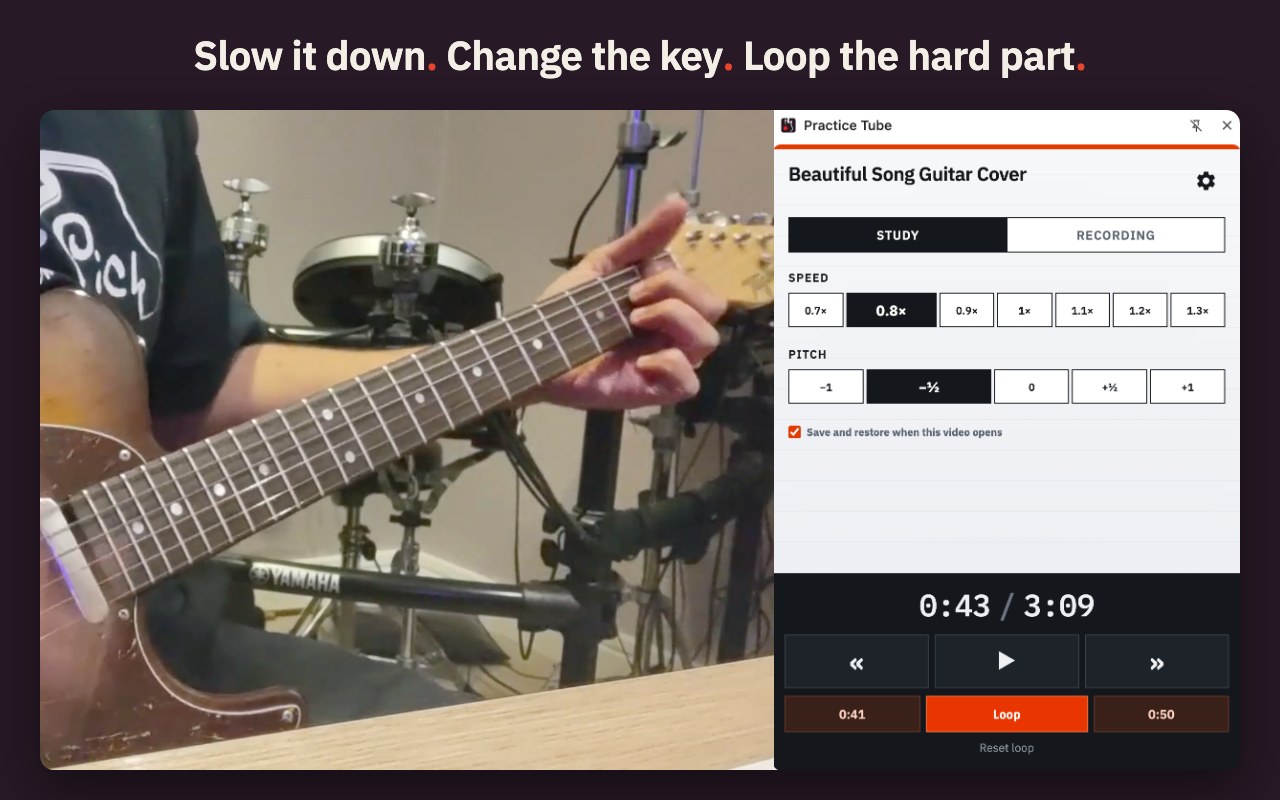
From 0.7× to 1.3×, and the pitch stays where it was. Slow enough to catch every note, still in the key you will play it in.
Up or down by up to a whole step, in half steps. Match a tuning, a capo or a singer without retuning anything.
Mark a start and an end, turn the loop on and play the hard bar until it is easy. One shortcut jumps back to A.
Tick one box and the video reopens with your last speed, key and loop points. Leave it unticked and nothing is saved.
Play, pause, skip, speed, key and loop all have shortcuts, so your hands can stay near the instrument.
The interface follows Chrome's language, and you can pick one yourself in Options.
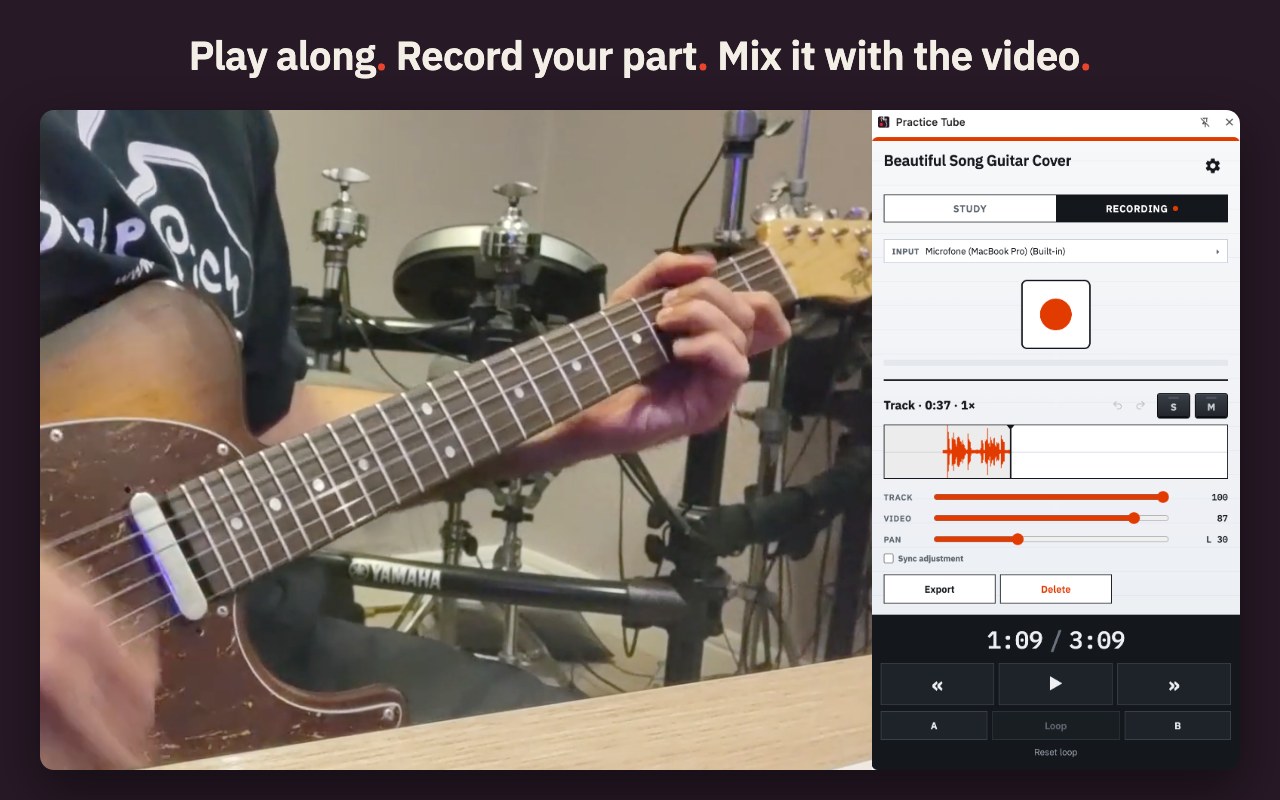
Record your instrument over the video and hear yourself in sync with the song. It is the quickest way to find out how that take really sounded.
Use the computer's microphone or your interface. With an interface, record input 1, input 2, or both mixed to mono.
Record again over only the part you want to fix. The rest of the recording stays as it was, and Undo brings back the previous version.
Separate volumes for the video and for you, plus pan, mute and solo for your track, and a fine sync adjustment in 5 ms steps.
Take your recording out as a WAV file, to keep, to send to your teacher or to open in any audio app.
Without them the microphone hears the video coming out of your speakers and records it along with you. With headphones, the track is just you.
Any video on youtube.com: a lesson, a live take, the album version. Practice Tube does nothing on other sites.
The Practice Tube icon in Chrome's toolbar opens the practice panel beside the video. The Study tab is ready to go.
Only if you want to record. It is asked on the Options page, one time: choose “Allow while visiting the site” and the Recording tab is ready for good.
Practice Tube has no server to send anything to. Your recordings and settings live in your own Chrome, and nowhere else.
Recordings, settings and saved setups stay in this Chrome profile on your computer. They are not synced to your Google account either.
There is nothing to sign up for, no usage tracking, no ads and no third-party services inside the extension.
It is used to record your instrument when you press Record. The audio is saved on your computer and goes nowhere else.
The extension works on www.youtube.com and does nothing on any other site you visit.
The whole story, item by item, including what is saved and how to delete it: read the privacy policy.
No purchases, no premium tier, no account, no ads. Practice Tube was made by a musician for daily practice, and it is yours too.
No. Speed and key are separate controls: at 0.8× the song is slower and still in its original key. If you want a different key, that is the other control, and it does not change the speed.
No. They are saved only in this Chrome profile, on your computer. Practice Tube has no server and no account, so there is nowhere for them to go. When you want a copy outside Chrome, Export saves the track as a WAV file.
Delete a single track on the Recording tab, or all of them at once in Options, which also shows how much space they use. Uninstalling the extension deletes everything it stored. Clearing your browsing history or cache does not delete recordings.
On Practice Tube's Options page, once: right-click the icon, choose Options, click Allow microphone and, when Chrome asks, choose “Allow while visiting the site”. With “Allow this time”, the permission ends when the page closes and recording stops working.
Not today. Chrome hands an extension at most two channels from an audio device, so Practice Tube records input 1, input 2, or both mixed to mono. A Zoom L6max that shows 14 inputs to your Mac shows 2 to Chrome.
No. Practice Tube works on www.youtube.com only, and does nothing anywhere else.
Google Chrome on a computer. It is built and tested there; other browsers may or may not run it, and I cannot promise they will.
No. Practice Tube is an independent extension, not affiliated with or endorsed by YouTube or Google.
Because I built it for my own practice and it should exist for everyone who learns songs by ear. If you also record on a Mac, OctoTrack Studio is WPTRAT's 8-track tape machine: free 14-day trial, $19.99 one-time, no subscription. Nothing is sold inside Practice Tube, ever.
Every message is read by the person who wrote the app, and answered as quickly as I can. No account, no ticket system, no newsletter.
● free · Google Chrome · nothing leaves your computer